Atualizando


Captura de tela do iPhone


Captura de tela do iPad


Descrição
MyToday is a diary you can easily write everything on.
The app is for those who love writing diaries.
Start with MyToday.
—
[Please read]
My Today does not store user data on the server.
The data is saved on the user's mobile phone. If My Today data is accidentally deleted for getting device capacity,
the text will not be visible and cannot be recovered.
In order to keep your valuable articles safely, it is recommended to periodically backup to 'Dropbox' or 'Google Drive'. (Required before device change / reset)
You can Backup from the setting of the My Today App.
—
[How to use MYTODAY]
• You can create today's diary by selecting the top area of the main screen.
• Select the camera icon to take a picture and attach it immediately.
• When you select the picture icon, you can attach up to 10 pictures from the camera roll.
• The location icon can add your current location or specific location information.
• If you touch the expansion icon, you can write and edit pictures on a wide screen.
• You can edit or delete the created list in the main screen by swiping left.
• You can use the full editing function by swiping the created list on the main screen to the right.
• On a 3D Touch-enabled device, you can edit or delete the list directly by tapping the list.
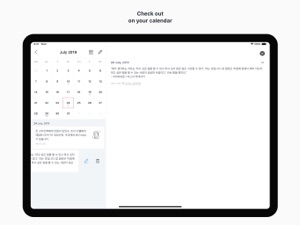
• You can check the diary by date by selecting the calendar icon in the upper right corner.
• You can find the diary by using the search icon in the upper left corner.
• Swipe up the calendar on the calendar screen to view the list on a wider screen.
• You can move the month with the left and right swipe gestures on the calendar screen, and you can see the previous year or the following year through the year view icon at the top.
• Dropbox backup and recovery is possible in the settings.
• You can back up data by e-mail in Settings.
• Notifications are available daily in Settings.
• You can check the written text only by yourself. You can make your passwords safer by setting passwords.
• For more information on backing up and restoring your data, please check the developer website.
Thank you for using My Today. :)
Novidades da versão 2.1.3
• A minor error has been fixed.
Vendedor
Nome
Yun Sun Kwon
Informações
Vendedor
Categorias
Versão
2.1.3
Tamanho
32,9 MB
Game Center
Não
VPP Device Licensing
Sim
Classificação
Classificação:
Compatibilidade
iOS 14.0 ou posterior
Dispositivos
iPhone 5s, iPhone 6, iPhone 6 Plus, iPhone 6s, iPhone 6s Plus, iPhone SE, iPhone 7, iPhone 7 Plus, iPhone 8, iPhone 8 Plus, iPhone X, iPhone XR, iPhone XS, iPhone XS Max, iPhone 11, iPhone 11 Pro, iPhone 11 Pro Max, iPhone SE (2ª geração), iPhone 12, iPhone 12 Pro, iPhone 12 Pro Max, iPhone 12 mini, iPhone 13, iPhone 13 Pro, iPhone 13 Pro Max, iPhone 13 mini, iPhone SE (3ª geração), iPhone 14, iPhone 14 Plus, iPhone 14 Pro, iPhone 14 Pro Max, iPad (5ª geração) Wi-Fi, iPad (5ª geração) Wi-Fi + Cellular, iPad (6ª geração) Wi-Fi, iPad (6ª geração) Wi-Fi + Cellular, iPad Pro, iPad Pro (Cellular), iPad Pro (9,7 polegadas), iPad Pro (9,7 polegadas) (Cellular), iPad Pro (12,9 polegadas) (2ª geração), iPad Pro (12,9 polegadas) (2ª geração) (Wi-Fi + Cellular), iPad Pro (10,5 polegadas), iPad Pro (10,5 polegadas) (Wi-Fi + Cellular), iPad Pro (11 polegadas), iPad Pro (11 polegadas) (Wi-Fi + Cellular), iPad Pro (12,9 polegadas) (3ª geração), iPad Pro (12,9 polegadas) (3ª geração) Wi-Fi + Cellular, iPad Air, iPad Air (Cellular), iPad Air 2, iPad Air 2 (Cellular), iPad Air (3ª geração), iPad Air (3ª geração) Wi-Fi + Cellular, iPad mini Retina, iPad mini Retina (Cellular), iPad mini 3, iPad mini 3 (Cellular), iPad mini 4, iPad mini 4 (Cellular), iPad mini (5ª geração), iPad mini (5ª geração) Wi-Fi + Cellular, iPad (7ª geração) Wi-Fi + Cellular, iPad Pro de 11 polegadas (2ª geração), iPad Pro de 11 polegadas (2ª geração) Wi-Fi + Cellular, iPad Pro de 12,9 polegadas (4ª geração), iPad Pro de 12,9 polegadas (4ª geração) Wi-Fi + Cellular, iPad Air (4ª geração) (Wi-Fi), iPad Air (4ª geração) (Wi-Fi + Cellular), iPad (8ª geração) Wi-Fi, iPad (8ª geração) Wi-Fi + Cellular, iPad Pro de 11 polegadas (3ª geração), iPad Pro de 11 polegadas (3ª geração) Wi-Fi + Cellular, iPad Pro de 12,9 polegadas (5ª geração), iPad Pro de 12,9 polegadas (5ª geração) Wi-Fi + Cellular, iPad (9ª geração), iPad (9ª geração) Wi-Fi + Cellular, iPad mini (6ª geração), iPad mini (6ª geração) Wi-Fi + Cellular, iPad Air (5ª geração), iPad Air (5ª geração) Wi-Fi + Cellular, iPad Pro de 11 polegadas (4ª geração), iPad Pro de 11 polegadas (4ª geração) Wi-Fi + Cellular, iPad Pro de 12,9 polegadas (6ª geração), iPad Pro de 12,9 polegadas (6ª geração) Wi-Fi + Cellular, iPad (10ª geração), iPad (10ª geração) Wi-Fi + Cellular, iPod touch (6ª Geração), iPod touch (7ª geração)
Idiomas
coreano, inglês
App Store: Avaliações de clientes
Classificações e Avaliações
0,0 de 5 (Sem avaliação)
App Store: Opiniões de clientes
Nenhuma entrada