SobreTermosPrivacidadeContato
 
Atualizando
DJI Ronin

DJI Ronin

Lançamento: 2017-09-29
© 2017 DJI
DJI Ronin - QR Code
Versão 1.4.6
Baixar na App Store
Versão 1.4.6
Baixar na App Store
Lançamento: 2017-09-29
© 2017 DJI

Captura de tela do iPhone

Captura de tela
Captura de tela
Captura de tela
Captura de tela
Captura de tela

Captura de tela do iPad

Captura de tela
Captura de tela
Captura de tela
Captura de tela
Captura de tela

Descrição

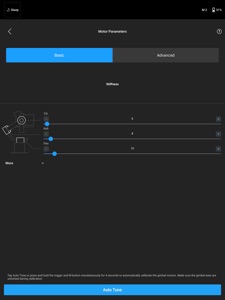
Personalize your Ronin shooting experience with the latest Ronin app from DJI. You can access and manage gimbal motor parameters, SmoothTrack, remote setup, and Ronin’s unique Axis Modes.
1.Easy, automated motor tuning
With Auto Tune, Ronin app can adjust motor parameters automatically based off the payload mounted. With such base line, you can further adjust the Stiffness, Strength, Control and Filter parameters accordingly.
2.Adaptive SmoothTrack
When Acceleration is set to be much higher than Speed, the Ronin will handle operator’s movements adaptively. You can achieve a complicated long take with only one group of settings.
3.Create with ease
With the newly added CamAnchor and Track mode, you can plan your shot in advance and execute it by a simple click.
4.Live gimbal data feed
Access gimbal operation data in real time and diagnose gimbal status.

Novidades da versão 1.4.6

DJI RS2 & RSC2:
-Supports zooming for Timelapse photography by controlling the focus motor during recording.
-Adds a focus motor control slider to the camera view that allows users to view the image transmission and adjust camera zoom simultaneously.
-Supports directly importing LUT files transferred from third-party apps to the DJI Ronin app
-Adds a high frame rate cache function. When enabled, the app caches the image transmission if the camera is exporting at a frame rate higher than 30 fps.
-Supports portrait ActiveTrack when using the Vertical Camera Mount.
RavenEye:
-Setting a strong password is no longer required for image transmission. Any password is acceptable.
-Adds a Clear mode where the user can double-tap the screen to clear the camera view of all controls and parameters.

Vendedor

Nome

SZ DJI TECHNOLOGY CO., LTD

Informações

Vendedor

Categorias

Versão

1.4.6

Tamanho

143,7 MB

Game Center

Não

VPP Device Licensing

Sim

Classificação

Classificação:

Compatibilidade

iOS 11.0 ou posterior

Dispositivos

iPhone 5s, iPhone 6, iPhone 6 Plus, iPhone 6s, iPhone 6s Plus, iPhone SE, iPhone 7, iPhone 7 Plus, iPhone 8, iPhone 8 Plus, iPhone X, iPhone XR, iPhone XS, iPhone XS Max, iPhone 11, iPhone 11 Pro, iPhone 11 Pro Max, iPhone SE (2ª geração), iPhone 12, iPhone 12 Pro, iPhone 12 Pro Max, iPhone 12 mini, iPad (5ª geração) Wi-Fi, iPad (5ª geração) Wi-Fi + Cellular, iPad (6ª geração) Wi-Fi, iPad (6ª geração) Wi-Fi + Cellular, iPad Pro, iPad Pro (Cellular), iPad Pro (9,7 polegadas), iPad Pro (9,7 polegadas) (Cellular), iPad Pro (12,9 polegadas) (2ª geração), iPad Pro (12,9 polegadas) (2ª geração) (Wi-Fi + Cellular), iPad Pro (10,5 polegadas), iPad Pro (10,5 polegadas) (Wi-Fi + Cellular), iPad Pro (11 polegadas), iPad Pro (11 polegadas) (Wi-Fi + Cellular), iPad Pro (12,9 polegadas) (3ª geração), iPad Pro (12,9 polegadas) (3ª geração) Wi-Fi + Cellular, iPad Air, iPad Air (Cellular), iPad Air 2, iPad Air 2 (Cellular), iPad Air (3ª geração), iPad Air (3ª geração) Wi-Fi + Cellular, iPad mini Retina, iPad mini Retina (Cellular), iPad mini 3, iPad mini 3 (Cellular), iPad mini 4, iPad mini 4 (Cellular), iPad mini (5ª geração), iPad mini (5ª geração) Wi-Fi + Cellular, iPad (7ª geração) Wi-Fi + Cellular, iPad Pro de 11 polegadas (2ª geração), iPad Pro de 11 polegadas (2ª geração) Wi-Fi + Cellular, iPad Pro de 12,9 polegadas (4ª geração), iPad Pro de 12,9 polegadas (4ª geração) Wi-Fi + Cellular, iPad Air (4ª geração) (Wi-Fi), iPad Air (4ª geração) (Wi-Fi + Cellular), iPad (8ª geração) Wi-Fi, iPad (8ª geração) Wi-Fi + Cellular, iPod touch (6ª Geração), iPod touch (7ª geração)

Idiomas

alemão, chinês, coreano, espanhol, francês, inglês, italiano, japonês, russo, tailandês

App Store: Avaliações de clientes

Classificações e Avaliações

3,5 de 5 (5 avaliações)

App Store: Opiniões de clientes

2020-04-30

Problema na atualização da firmware do ronin

Depois que atualizei funcionou normal durante um tempo, depois a comunicação do ronin com a câmera deu problema. O botão de rec não está funcionando, quando clico aparece uma mensagem na câmera que o botão de foto deve ser clicado no modo foto, sendo que sempre funcionou para REC. Testei minha câmera em outro ronin e estava tudo ok. Tbm testei o cabo do meu ronin em outro e tbm estava tudo ok, preciso de um suporte pra isso.
Vocês deram a dica de fazer downgrade, mas como faço o downgrade?
Max23well23
Versão 1.2.8