Atualizando


Captura de tela do iPhone
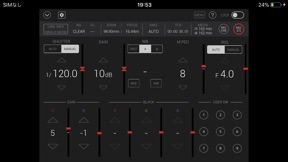

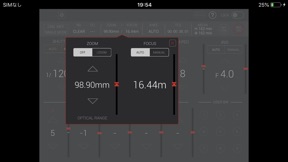
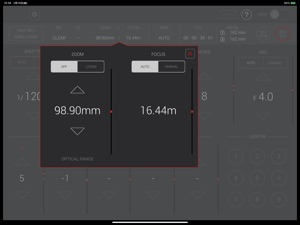
Captura de tela do iPad


Descrição
=== Name of App ===
HC ROP (HC series memory camera recorder Remote Operation Panel)
=== Description ===
HC ROP is a control program that enables the wireless remote control of the memory camera recorder "Panasonic HC-X series" and "Panasonic AG-CX series"(excluding some models).
It provides a GUI that displays status information, settings and user switch status in a single screen and the ability to change camera settings intuitively using a screen touch.
Buttons such as user buttons and REC S/S button in screen can manipulate camera recorder.
HC ROP cam manipulate one memory camera reorder by switching up to eight memory camera reorders. Please tap a "?" button to see a hint for usage of this app.
=== Applicable Model ===
HC-X1500, HC-X2000、HC-X1200、HC-X1600、HC-X1800、HC-X2100、HC-X2、HC-X20
AG-CX7, AG-CX8, AG-CX10, AG-CX98、AG-CX20、AG-CX100、AG-CX18
=== Supported OS ===
iOS 15 or later
iPadOS 15 or later
=== Features ===
1. Camera status display
- List of camera information
- ND/CC FILTER
- ZOOM/FOCUS
- KNEE
- TCG
- Remaining time of recording media
2. CONTROLLABLE FUNCTIONS
- SHUTTER (AUTO/MANUAL)
- GAIN
- WHITE BALANCE(PRE/A/B, AWB, ABB)
- MASTER PEDESTAL
- IRIS(AUTO/MANUAL)
- Painting GAIN(R/B)
- USER SW (1-9)
- MENU display and setting
- HELP
- LOCK(disable operation on HC ROP)
- ZOOM(i.ZOOM/i.ZOOM_OFF)
- FOCUS(AUTO/MANUAL)
- KNEE(AUTO/MANUAL(MID))
- TCG(TC/UB display and setting)
- REC CHECK
- REC Start/Stop
3. Settings and switching of a connected camera
You can set or switch connected cameras in a connect setting panel by tapping a connect manipulation button in the screen. Please refer to "CONNECTION" item by tapping "?" for details.
=== NOTE ===
(1)Permission for the local network is required since iOS14. If you cannot connect the app to the camera, make the following settings.
1. Open "Settings" on iPhone/iPad
2. Select "Privacy">"Local Network"
3. Set "HC ROP" to "ON"
(2)In iOS, camera information may not be displayed correctly on the app screen.This can be fixed by turning on airplane mode and then turning off again.
1. Close "CX ROP".
2. Select "Settings" on the device home screen
3. Turn on "Airplane mode"
4. Turn off "Airplane mode"
5. Launch "CX ROP"
*These settings need to be repeated after turning off or restarting the device.
Novidades da versão 1.3
Added live view display function
Informações
Vendedor
Categorias
Versão
1.3
Tamanho
42,5 MB
Game Center
Não
VPP Device Licensing
Sim
Classificação
Classificação:
Compatibilidade
iOS 15.0 ou posterior
Dispositivos
iPhone 5s, iPhone 6, iPhone 6 Plus, iPhone 6s, iPhone 6s Plus, iPhone SE, iPhone 7, iPhone 7 Plus, iPhone 8, iPhone 8 Plus, iPhone X, iPhone XR, iPhone XS, iPhone XS Max, iPhone 11, iPhone 11 Pro, iPhone 11 Pro Max, iPhone SE (2ª geração), iPhone 12, iPhone 12 Pro, iPhone 12 Pro Max, iPhone 12 mini, iPhone 13, iPhone 13 Pro, iPhone 13 Pro Max, iPhone 13 mini, iPhone SE (3ª geração), iPhone 14, iPhone 14 Plus, iPhone 14 Pro, iPhone 14 Pro Max, iPhone 15, iPhone 15 Plus, iPhone 15 Pro, iPhone 15 Pro Max, iPhone 16, iPhone 16Plus, iPhone 16Pro, iPhone 16ProMax, iPhone 16e, iPad (5ª geração) Wi-Fi, iPad (5ª geração) Wi-Fi + Cellular, iPad (6ª geração) Wi-Fi, iPad (6ª geração) Wi-Fi + Cellular, iPad Pro, iPad Pro (Cellular), iPad Pro (9,7 polegadas), iPad Pro (9,7 polegadas) (Cellular), iPad Pro (12,9 polegadas) (2ª geração), iPad Pro (12,9 polegadas) (2ª geração) (Wi-Fi + Cellular), iPad Pro (10,5 polegadas), iPad Pro (10,5 polegadas) (Wi-Fi + Cellular), iPad Pro (11 polegadas), iPad Pro (11 polegadas) (Wi-Fi + Cellular), iPad Pro (12,9 polegadas) (3ª geração), iPad Pro (12,9 polegadas) (3ª geração) Wi-Fi + Cellular, iPad Air, iPad Air (Cellular), iPad Air 2, iPad Air 2 (Cellular), iPad Air (3ª geração), iPad Air (3ª geração) Wi-Fi + Cellular, iPad mini Retina, iPad mini Retina (Cellular), iPad mini 3, iPad mini 3 (Cellular), iPad mini 4, iPad mini 4 (Cellular), iPad mini (5ª geração), iPad mini (5ª geração) Wi-Fi + Cellular, iPad (7ª geração) Wi-Fi + Cellular, iPad Pro de 11 polegadas (2ª geração), iPad Pro de 11 polegadas (2ª geração) Wi-Fi + Cellular, iPad Pro de 12,9 polegadas (4ª geração), iPad Pro de 12,9 polegadas (4ª geração) Wi-Fi + Cellular, iPad Air (4ª geração) (Wi-Fi), iPad Air (4ª geração) (Wi-Fi + Cellular), iPad (8ª geração) Wi-Fi, iPad (8ª geração) Wi-Fi + Cellular, iPad Pro de 11 polegadas (3ª geração), iPad Pro de 11 polegadas (3ª geração) Wi-Fi + Cellular, iPad Pro de 12,9 polegadas (5ª geração), iPad Pro de 12,9 polegadas (5ª geração) Wi-Fi + Cellular, iPad (9ª geração), iPad (9ª geração) Wi-Fi + Cellular, iPad mini (6ª geração), iPad mini (6ª geração) Wi-Fi + Cellular, iPad Air (5ª geração), iPad Air (5ª geração) Wi-Fi + Cellular, iPad Pro de 11 polegadas (4ª geração), iPad Pro de 11 polegadas (4ª geração) Wi-Fi + Cellular, iPad Pro de 12,9 polegadas (6ª geração), iPad Pro de 12,9 polegadas (6ª geração) Wi-Fi + Cellular, iPad (10ª geração), iPad (10ª geração) Wi-Fi + Cellular, iPad Air de 11 polegadas (M2) Wi-Fi, iPad Air de 13 polegadas (M2) Wi-Fi, iPad Air de 13 polegadas (M2) Wi-Fi + Cellular, iPad Pro de 11 polegadas (M4) Wi-Fi, iPad Pro de 11 polegadas (M4) Wi-Fi + Cellular, iPad Pro de 13 polegadas (M4) Wi-Fi, iPad Pro de 13 polegadas (M4) Wi-Fi + Cellular, iPad A16, iPad A16Cellular, iPad Air11M3, iPad Air11M3Cellular, iPad Air13M3, iPad Air13M3Cellular, iPad MiniA17Pro, iPad MiniA17ProCellular, iPod touch (6ª Geração), iPod touch (7ª geração)
Idiomas
App Store: Avaliações de clientes
Classificações e Avaliações
0,0 de 5 (Sem avaliação)
App Store: Opiniões de clientes
Nenhuma entrada