Atualizando


Captura de tela do iPhone


Captura de tela do iPad


Descrição
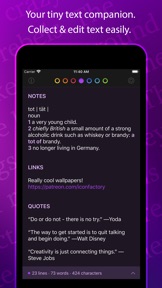
Tot is an elegant, simple way to collect & edit text across your Mac, iPhone, and iPad. It’s your tiny text companion!
⁕ Less Is More
Tot’s single window design and simple formatting controls mean no more hunting for that chunk of text. Seven color-coded dots let you organize your notes while keeping them from getting out of hand.
⁕ Dark / Light Mode
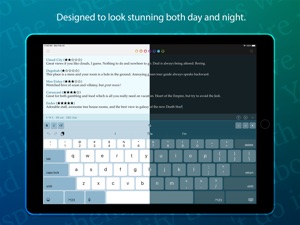
Designed to look stunning both day and night, Tot takes full advantage of iOS and macOS themes.
⁕ Small Footprint
Stays out of the way on the desktop with minimal chrome and can even be controlled via the Menu bar. On mobile, each dot is just a swipe away.
⁕ iCloud Sync
Seamlessly syncs your text across iOS and macOS using iCloud so you can capture thoughts wherever you are.
⁕ Markdown Support
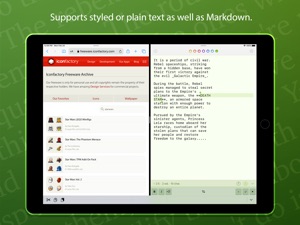
Full support for rich or plain text and even automatically translates text to Markdown for handy use on the web. Have an RTF file you need marked up? No problem!
⁕ Killer Keyboard
Tot puts common text operations on the keyboard and keeps track of word and character counts as you type.
⁕ Accessible
Tot takes accessibility seriously with affordances for color blindness and full support for VoiceOver.
Available for iOS and macOS.
Novidades da versão 1.2.1
All:
• Dot defragger: compacts dots to keep things clean and organized:
- Cleans up dots by moving full ones to the left and empty ones to the right
- iOS: Use “Compact Dots” in share sheet (or tap & hold on share icon)
- macOS: Use Window > Compact Dots… (or ⇧⌘D)
• AutoList will only remove bullets if they are in the middle of a list [Thanks Ian!]
• Fixed check for 100,000 characters: deleting text no longer triggers the alert
• If the first paragraph of a dot is mostly Arabic or Hebrew, the text will automatically switch to using a Right-to-Left writing direction [Thanks Ezra!]
• In plain text, ⌘B and ⌘I inserts a single Markdown character without a selection (this previously only worked with selected text)
macOS:
• New symbol picker added to status bar:
- Click on the asterisk to get a popover with symbols
- Pick a bullet to start a new list, Emoji to add status, or any other symbol
- A quick alternative to ⌃⌘Spacebar
iOS:
• Fixed sample text at first launch
Vendedor
Nome
The Iconfactory
Endereço
Informações
Vendedor
Categorias
Versão
1.2.1
Tamanho
4,9 MB
Game Center
Não
VPP Device Licensing
Sim
Classificação
Classificação:
Compatibilidade
iOS 13.0 ou posterior
Dispositivos
iPhone 5s, iPhone 6, iPhone 6 Plus, iPhone 6s, iPhone 6s Plus, iPhone SE, iPhone 7, iPhone 7 Plus, iPhone 8, iPhone 8 Plus, iPhone X, iPhone XR, iPhone XS, iPhone XS Max, iPhone 11, iPhone 11 Pro, iPhone 11 Pro Max, iPhone SE (2ª geração), iPhone 12, iPhone 12 Pro, iPhone 12 Pro Max, iPhone 12 mini, iPad (5ª geração) Wi-Fi, iPad (5ª geração) Wi-Fi + Cellular, iPad (6ª geração) Wi-Fi, iPad (6ª geração) Wi-Fi + Cellular, iPad Pro, iPad Pro (Cellular), iPad Pro (9,7 polegadas), iPad Pro (9,7 polegadas) (Cellular), iPad Pro (12,9 polegadas) (2ª geração), iPad Pro (12,9 polegadas) (2ª geração) (Wi-Fi + Cellular), iPad Pro (10,5 polegadas), iPad Pro (10,5 polegadas) (Wi-Fi + Cellular), iPad Pro (11 polegadas), iPad Pro (11 polegadas) (Wi-Fi + Cellular), iPad Pro (12,9 polegadas) (3ª geração), iPad Pro (12,9 polegadas) (3ª geração) Wi-Fi + Cellular, iPad Air, iPad Air (Cellular), iPad Air 2, iPad Air 2 (Cellular), iPad Air (3ª geração), iPad Air (3ª geração) Wi-Fi + Cellular, iPad mini Retina, iPad mini Retina (Cellular), iPad mini 3, iPad mini 3 (Cellular), iPad mini 4, iPad mini 4 (Cellular), iPad mini (5ª geração), iPad mini (5ª geração) Wi-Fi + Cellular, iPad (7ª geração) Wi-Fi + Cellular, iPad Pro de 11 polegadas (2ª geração), iPad Pro de 11 polegadas (2ª geração) Wi-Fi + Cellular, iPad Pro de 12,9 polegadas (4ª geração), iPad Pro de 12,9 polegadas (4ª geração) Wi-Fi + Cellular, iPad Air (4ª geração) (Wi-Fi), iPad Air (4ª geração) (Wi-Fi + Cellular), iPad (8ª geração) Wi-Fi, iPad (8ª geração) Wi-Fi + Cellular, iPod touch (6ª Geração), iPod touch (7ª geração)
Idiomas
inglês
App Store: Avaliações de clientes
Classificações e Avaliações
5,0 de 5 (1 avaliação)
App Store: Opiniões de clientes
Nenhuma entrada