Atualizando


+2
#35 em Top apps pagos > Para desenvolvedores
Captura de tela do iPhone


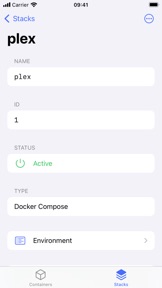
Captura de tela do iPad


Descrição
Meet Harbour - Docker/Portainer Management App for iOS!
Multiple Servers & Endpoints
Effortlessly manage multiple Docker servers and endpoints from one centralized platform. Whether it's your home server, or production environment at work, Harbour ensures seamless connectivity and control.
Manage Your Containers
Take charge of your Docker containers with ease. From managing container's states, to monitoring their status and logs, Harbour puts container management at your fingertips.
Control Your Stacks
Streamline your application deployment process by managing Docker stacks efficiently. With Harbour, you can effortlessly view, start/stop, deploy and remove stacks, ensuring smooth operation of your containerized applications.
Widgets - Containers at a Glance
Stay informed about your containers' status and performance with Harbour's intuitive widgets. Get (almost) real-time insights right on your Home Screen, keeping you updated without switching between applications.
Handoff - Continue Where You Left Off
Seamlessly transition between your iOS device and other Apple devices with Handoff support. Start your Docker management tasks on one device and effortlessly continue from where you left off on another, ensuring uninterrupted productivity.
Background Notifications
Stay informed about important events and updates even when Harbour is not actively in use. Background notifications keep you in the loop, ensuring you never miss critical alerts regarding your Docker containers.
iPadOS Support
Extend your Docker management capabilities to your iPad with full support for iPadOS. Enjoy the convenience of managing your containers and stacks on a larger screen, whether you're at your desk or on the go.
No Telemetry
Your privacy matters. Harbour is committed to respecting your privacy by ensuring that no telemetry data is collected :)
Novidades da versão 4.1.0
## 4.1.0 - A Stacked Release
### Fully-Fledged Stacks Support
- Stacks now have their own dedicated tab
- Added a detail view for stacks
- Implemented stack creation
- Added ability to filter stacks by active endpoint, as well as displaying limited/external and orphaned stacks
### Notification Improvements
- Tapping a notification will navigate to the appropriate view
### Fixes & Improvements
- Improved setup stability and speed
- Key-value views are now searchable
- View-specific options are now visible in their respective views, instead of being in global settings
Vendedor
Nome
Kacper Kaczmarzyk
Endereço
Informações
Vendedor
Categorias
Versão
4.1.0
Tamanho
9 MB
Game Center
Não
VPP Device Licensing
Sim
Classificação
Classificação:
Compatibilidade
iOS 17.0 ou posterior
Dispositivos
iPhone 5s, iPhone 6, iPhone 6 Plus, iPhone 6s, iPhone 6s Plus, iPhone SE, iPhone 7, iPhone 7 Plus, iPhone 8, iPhone 8 Plus, iPhone X, iPhone XR, iPhone XS, iPhone XS Max, iPhone 11, iPhone 11 Pro, iPhone 11 Pro Max, iPhone SE (2ª geração), iPhone 12, iPhone 12 Pro, iPhone 12 Pro Max, iPhone 12 mini, iPhone 13, iPhone 13 Pro, iPhone 13 Pro Max, iPhone 13 mini, iPhone SE (3ª geração), iPhone 14, iPhone 14 Plus, iPhone 14 Pro, iPhone 14 Pro Max, iPhone 15, iPhone 15 Plus, iPhone 15 Pro, iPhone 15 Pro Max, iPad (5ª geração) Wi-Fi, iPad (5ª geração) Wi-Fi + Cellular, iPad (6ª geração) Wi-Fi, iPad (6ª geração) Wi-Fi + Cellular, iPad Pro, iPad Pro (Cellular), iPad Pro (9,7 polegadas), iPad Pro (9,7 polegadas) (Cellular), iPad Pro (12,9 polegadas) (2ª geração), iPad Pro (12,9 polegadas) (2ª geração) (Wi-Fi + Cellular), iPad Pro (10,5 polegadas), iPad Pro (10,5 polegadas) (Wi-Fi + Cellular), iPad Pro (11 polegadas), iPad Pro (11 polegadas) (Wi-Fi + Cellular), iPad Pro (12,9 polegadas) (3ª geração), iPad Pro (12,9 polegadas) (3ª geração) Wi-Fi + Cellular, iPad Air, iPad Air (Cellular), iPad Air 2, iPad Air 2 (Cellular), iPad Air (3ª geração), iPad Air (3ª geração) Wi-Fi + Cellular, iPad mini Retina, iPad mini Retina (Cellular), iPad mini 3, iPad mini 3 (Cellular), iPad mini 4, iPad mini 4 (Cellular), iPad mini (5ª geração), iPad mini (5ª geração) Wi-Fi + Cellular, iPad (7ª geração) Wi-Fi + Cellular, iPad Pro de 11 polegadas (2ª geração), iPad Pro de 11 polegadas (2ª geração) Wi-Fi + Cellular, iPad Pro de 12,9 polegadas (4ª geração), iPad Pro de 12,9 polegadas (4ª geração) Wi-Fi + Cellular, iPad Air (4ª geração) (Wi-Fi), iPad Air (4ª geração) (Wi-Fi + Cellular), iPad (8ª geração) Wi-Fi, iPad (8ª geração) Wi-Fi + Cellular, iPad Pro de 11 polegadas (3ª geração), iPad Pro de 11 polegadas (3ª geração) Wi-Fi + Cellular, iPad Pro de 12,9 polegadas (5ª geração), iPad Pro de 12,9 polegadas (5ª geração) Wi-Fi + Cellular, iPad (9ª geração), iPad (9ª geração) Wi-Fi + Cellular, iPad mini (6ª geração), iPad mini (6ª geração) Wi-Fi + Cellular, iPad Air (5ª geração), iPad Air (5ª geração) Wi-Fi + Cellular, iPad Pro de 11 polegadas (4ª geração), iPad Pro de 11 polegadas (4ª geração) Wi-Fi + Cellular, iPad Pro de 12,9 polegadas (6ª geração), iPad Pro de 12,9 polegadas (6ª geração) Wi-Fi + Cellular, iPad (10ª geração), iPad (10ª geração) Wi-Fi + Cellular, iPod touch (6ª Geração), iPod touch (7ª geração), Mac Desktop
Idiomas
inglês
App Store: Avaliações de clientes
Classificações e Avaliações
0,0 de 5 (Sem avaliação)
App Store: Opiniões de clientes
Nenhuma entrada