Atualizando


Captura de tela do iPhone




Descrição
Use Print Online to access your files on iDisk/MobileMe, Box.net, or Dropbox, print to over 1,400 printers, and upload documents to FedEx Office® Print Online.
"EXCELLENT APP VERY HANDY. Does take some use to getting use to but when you do it's great. A+++++++++" - SS, Sep 22, 2011
FEATURES
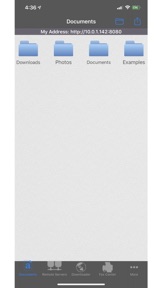
• View/print many document types, including PDF, Word, Excel, bitmap, TIFF, text, HTML, Open Office, GIF, and encapsulated PostScript.
• Create new text documents.
• Use a web browser to transfer files between your computer and this app.
• Print to networked or shared printers. No additional software is necessary. This app includes support for over 1,400 printers from HP, Epson, Canon, Samsung, Brother, Lexmark, Xerox, Ricoh, Oki, Kyocera, Infotec, NRG, Lanier, and many more!
• Send faxes to over 220 countries and territories worldwide - no subscription required![1]
• Get a professional USA-based toll-free number for your incoming faxes and voicemail.[2]
• Send postcards and letters via USPS (postal mail).
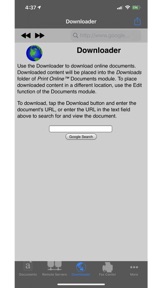
• Print remote files on MobileMe, Box.net, or Dropbox, or download them into this app.
• Print web-based files or download them into this app.
• Upload documents to FedEx Office® Print Online, a leading provider of print services with over 1800 locations worldwide. (iPhone version only)
DOES THIS APP SUPPORT MY PRINTER?
See the list of printer models this app supports at http://www.ndilitechnologies.com/help.html.
HOW DO I USE THIS APP TO PRINT/FAX FROM MY OTHER APPS?
Import the files from your other iPhone/iPad apps into this app, and then use this app to print/fax them.
(The operating system of the iPad/iPhone/iPod, iOS, is designed such that each app you install is given its own storage space. There is no centralized (shared) storage space on your device. This means that this app's proprietary printing engine only works within this app. The iOS does not support/allow third party system-wide drivers. The iOS cannot use this app to print files within another app's storage space—for example, files stored in Pages, Numbers, Safari, Notes, Mail, etc. Therefore, files created in other apps must be imported into this app.)
IS THERE HELP AVAILABLE?
Yes. In addition to the built-in user guide, you can also ask questions via our real-time chat Customer Support module.
Notes Regarding the optional Toll Free Number Subscription:
• Title of service: Toll-Free Number Subscription
• Length of subscription: 1,3, 6 or 12 month options
• Price of subscription: $14.99,$39.99,$79.99,$14.99/year.
• Payment will be charged to iTunes Account at confirmation of purchase
• Subscription automatically renews unless auto-renew is turned off at least 24-hours before the end of the current period
• Account will be charged for renewal within 24-hours prior to the end of the current period, and identify the cost of the renewal
• No cancellation of the current subscription is allowed during active subscription period
• Any unused portion of a free trial period, if offered, will be forfeited when the user purchases a subscription to that publication.
• Subscriptions may be managed by the user and auto-renewal may be turned off by going to the user’s Account Settings after purchase
[1] Each fax unit purchases a one-page fax that can be sent in 60 seconds or less to a destination in the United States or Canada. The number of fax units needed to transmit a one-page 60-second fax to a destination in another country is listed in the rate card within this app. Please note that a page that requires a longer transmission time (for example, a page containing high resolution graphics) consumes additional fax units.
[2] To receive voicemail or faxes, you must setup an incoming toll-free phone number. The toll-free phone number requires a monthly subscription. 60 minutes/month are included free with subscription. Toll-free numbers are USA-based numbers and are accessible in the United States only.
Privacy and terms of use: http://www.ndilitechnologies.com/privacy
Novidades da versão 5.1
- system updates and enhancements
Vendedor
Nome
Ndili Technologies, Inc
Endereço
Informações
Vendedor
Categorias
Versão
5.1
Tamanho
180,2 MB
Game Center
Não
VPP Device Licensing
Sim
Classificação
Classificação de acordo com o seguinte:
Compatibilidade
iOS 12.0 ou posterior
Dispositivos
iPhone 5s, iPhone 6, iPhone 6 Plus, iPhone 6s, iPhone 6s Plus, iPhone SE, iPhone 7, iPhone 7 Plus, iPhone 8, iPhone 8 Plus, iPhone X, iPhone XR, iPhone XS, iPhone XS Max, iPhone 11, iPhone 11 Pro, iPhone 11 Pro Max, iPhone SE (2ª geração), iPhone 12, iPhone 12 Pro, iPhone 12 Pro Max, iPhone 12 mini, iPhone 13, iPhone 13 Pro, iPhone 13 Pro Max, iPhone 13 mini, iPhone SE (3ª geração), iPhone 14, iPhone 14 Plus, iPhone 14 Pro, iPhone 14 Pro Max, iPhone 15, iPhone 15 Plus, iPhone 15 Pro, iPhone 15 Pro Max, iPhone 16, iPhone 16Plus, iPhone 16Pro, iPhone 16ProMax, iPad (5ª geração) Wi-Fi, iPad (5ª geração) Wi-Fi + Cellular, iPad (6ª geração) Wi-Fi, iPad (6ª geração) Wi-Fi + Cellular, iPad Pro, iPad Pro (Cellular), iPad Pro (9,7 polegadas), iPad Pro (9,7 polegadas) (Cellular), iPad Pro (12,9 polegadas) (2ª geração), iPad Pro (12,9 polegadas) (2ª geração) (Wi-Fi + Cellular), iPad Pro (10,5 polegadas), iPad Pro (10,5 polegadas) (Wi-Fi + Cellular), iPad Pro (11 polegadas), iPad Pro (11 polegadas) (Wi-Fi + Cellular), iPad Pro (12,9 polegadas) (3ª geração), iPad Pro (12,9 polegadas) (3ª geração) Wi-Fi + Cellular, iPad Air, iPad Air (Cellular), iPad Air 2, iPad Air 2 (Cellular), iPad Air (3ª geração), iPad Air (3ª geração) Wi-Fi + Cellular, iPad mini Retina, iPad mini Retina (Cellular), iPad mini 3, iPad mini 3 (Cellular), iPad mini 4, iPad mini 4 (Cellular), iPad mini (5ª geração), iPad mini (5ª geração) Wi-Fi + Cellular, iPad (7ª geração) Wi-Fi + Cellular, iPad Pro de 11 polegadas (2ª geração), iPad Pro de 11 polegadas (2ª geração) Wi-Fi + Cellular, iPad Pro de 12,9 polegadas (4ª geração), iPad Pro de 12,9 polegadas (4ª geração) Wi-Fi + Cellular, iPad Air (4ª geração) (Wi-Fi), iPad Air (4ª geração) (Wi-Fi + Cellular), iPad (8ª geração) Wi-Fi, iPad (8ª geração) Wi-Fi + Cellular, iPad Pro de 11 polegadas (3ª geração), iPad Pro de 11 polegadas (3ª geração) Wi-Fi + Cellular, iPad Pro de 12,9 polegadas (5ª geração), iPad Pro de 12,9 polegadas (5ª geração) Wi-Fi + Cellular, iPad (9ª geração), iPad (9ª geração) Wi-Fi + Cellular, iPad mini (6ª geração), iPad mini (6ª geração) Wi-Fi + Cellular, iPad Air (5ª geração), iPad Air (5ª geração) Wi-Fi + Cellular, iPad Pro de 11 polegadas (4ª geração), iPad Pro de 11 polegadas (4ª geração) Wi-Fi + Cellular, iPad Pro de 12,9 polegadas (6ª geração), iPad Pro de 12,9 polegadas (6ª geração) Wi-Fi + Cellular, iPad (10ª geração), iPad (10ª geração) Wi-Fi + Cellular, iPad Air de 11 polegadas (M2) Wi-Fi, iPad Air de 13 polegadas (M2) Wi-Fi, iPad Air de 13 polegadas (M2) Wi-Fi + Cellular, iPad Pro de 11 polegadas (M4) Wi-Fi, iPad Pro de 11 polegadas (M4) Wi-Fi + Cellular, iPad Pro de 13 polegadas (M4) Wi-Fi, iPad Pro de 13 polegadas (M4) Wi-Fi + Cellular, iPad MiniA17Pro, iPad MiniA17ProCellular, iPod touch (6ª Geração), iPod touch (7ª geração)
Idiomas
inglês
App Store: Avaliações de clientes
Classificações e Avaliações
3,0 de 5 (1 avaliação)
App Store: Opiniões de clientes
Nenhuma entrada